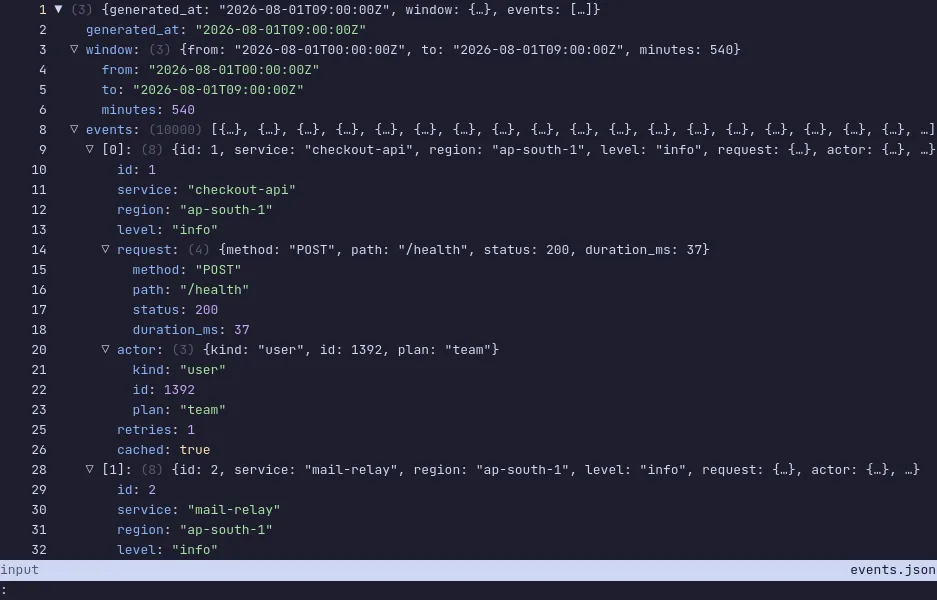
jless is a pager for JSON: open a file of any size, fold whole arrays down to a single line, search across the parts that are folded, and read the structure instead of the punctuation.
It is what less should have been for JSON. Keys and values are
colour-coded, long strings are truncated until you ask for them, every
node has a path you can copy, and search is a regular expression over
the whole document, folded parts included. It reads YAML too, and it is
fast enough that a file of hundreds of megabytes opens without a wait.
The demo opens a 2 MB file of 10,000 request events. Press Space on the
events line to fold all 10,000 into {…}, type /error to jump to the
failures, m to switch between data mode and line mode, and ? for the
rest of the keys — the list is short, because this is a pager and not an
editor. The VM is private to your browser tab; nothing you type leaves it.
Keys to know
j / k | move down and up |
Space | fold or unfold the node under the cursor |
/ | search |
n / N | next and previous match |
m | switch between data mode and line mode |
yy | copy the value under the cursor |
? | show every key |
q | quit |
Install jless on your own machine
| Alpine | apk add jless |
| macOS (Homebrew) | brew install jless |
| Arch | pacman -S jless |
| cargo | cargo install jless |
This VM was last built on Oct 15, 2026. How Demoshell demos work →