micro is a terminal editor with nothing to learn first: the arrow keys
move, typing types, Ctrl-S saves, and the mouse works. It is one binary,
with syntax highlighting, multiple cursors and undo already inside it.
It is the editor to install on a server when you do not want to teach
anyone modes. Shortcuts follow what desktop editors use — Ctrl-C,
Ctrl-V, Ctrl-Z, Ctrl-F — and the mouse selects, scrolls and places
the cursor. Split panes, a built-in terminal, plugins in Lua and over a
hundred syntax definitions come with the one Go binary.
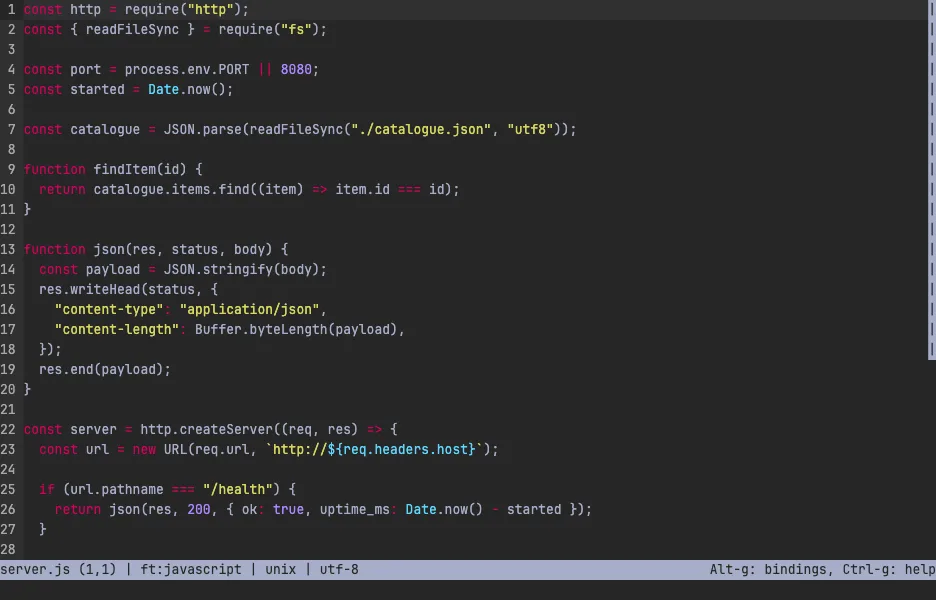
The demo opens a small Node service. Type anywhere, press Ctrl-F to
search, or double-click a word and press Alt-N to put a cursor on the
next copy of it — then type once and change them all. Ctrl-S saves,
Ctrl-G opens the help, Ctrl-Q quits. The VM is private to your browser
tab; nothing you type leaves it.
Keys to know
Ctrl-S | save |
Ctrl-Q | quit |
Ctrl-F | find |
Ctrl-Z | undo |
Ctrl-A | select all |
Ctrl-K | cut the current line |
Alt-N | put another cursor on the next copy of the selection |
Ctrl-E | open the command bar |
Ctrl-G | open the help |
Install micro on your own machine
| Alpine | apk add micro |
| Debian / Ubuntu | apt install micro |
| macOS (Homebrew) | brew install micro |
| any Linux | curl https://getmic.ro | bash |
This VM was last built on Oct 15, 2026. How Demoshell demos work →
Similar tools you can try here
- Neovim Tutor — Learn Vim in your browser with Neovim's built-in interactive tutorial (vimtutor), running live in a private Linux VM. Nothing to install.
- Helix — The modal editor with selection-first editing, multiple cursors and built-in language support, running live in a private Linux VM.
- TTT — A terminal code editor that works like VS Code, with mouse, tabs, Ctrl shortcuts, project search and git, live in a private VM.