TTT (ttt)
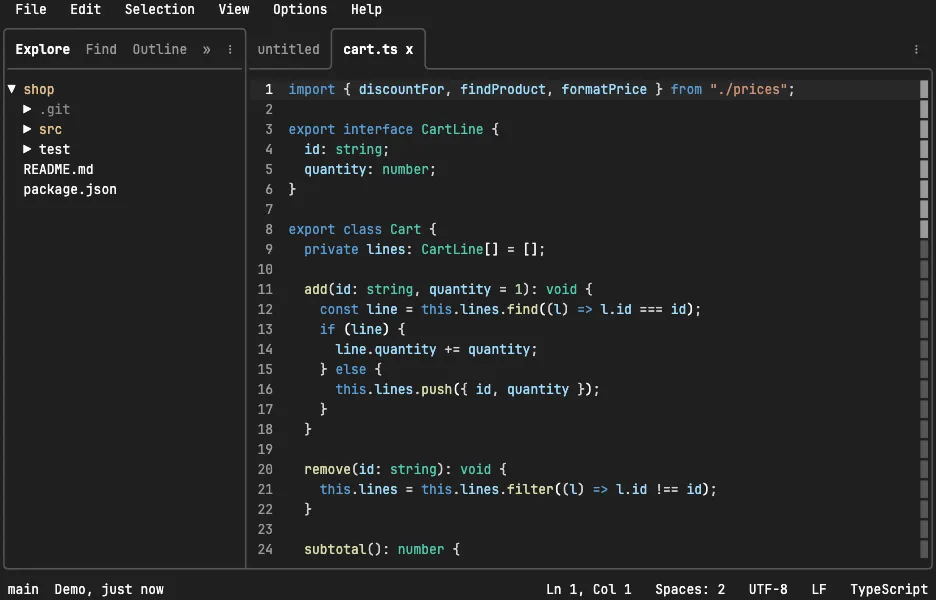
TTT is a code editor for the terminal that behaves like a desktop one. The mouse clicks, drags and scrolls, files open in tabs, the shortcuts are the ones VS Code taught everybody, and there are no modes to learn. It is a single Go binary with no configuration needed, and it runs over SSH like anything else in a terminal.
What makes it an editor rather than a notepad is inside: multiple
cursors with Ctrl-D, a command palette on Ctrl-P, a file tree and a
project-wide search panel powered by ripgrep, a git changes panel where
you stage and commit, a terminal in the bottom panel, code folding, and
language servers for completion and go-to-definition. Keybindings are a
JSON file, and chords such as Ctrl-K F work the way they do in VS Code.
The demo opens a small TypeScript shop module with one edit not yet
committed. Press Ctrl-F and type total to find it, Ctrl-D a few
times to put a cursor on every copy of a word, Ctrl-K then F to
search the project for TODO, then Ctrl-K then C to read the diff,
stage it with Space and commit it. The VM is private to your browser
tab; nothing you type leaves it.
Keys to know
Ctrl-F | find in the file |
Ctrl-D | add a cursor on the next copy of the word |
Ctrl-P | the command palette: every command with its shortcut |
Ctrl-K, then P | open a file by name |
Ctrl-K, then F | search the whole project |
Ctrl-K, then C | the uncommitted changes, with a diff per file |
Space / Tab / Enter in the changes list | stage the file, move to the message box, commit |
Ctrl-K, then B | the bottom panel with a terminal in it |
Ctrl-W | close the tab |
Ctrl-Q | quit |
Install TTT on your own machine
| macOS (Homebrew) | brew tap eugenioenko/ttt && brew trust eugenioenko/ttt && brew install ttt |
| any Linux | curl -sSfL https://raw.githubusercontent.com/eugenioenko/ttt/main/install.sh | sh |
| Arch (AUR) | yay -S ttt |
| Windows (scoop) | scoop install ttt |
This VM was last built on Oct 13, 2026. How Demoshell demos work →
Similar tools you can try here
- Neovim Tutor — Learn Vim in your browser with Neovim's built-in interactive tutorial (vimtutor), running live in a private Linux VM. Nothing to install.
- Helix — The modal editor with selection-first editing, multiple cursors and built-in language support, running live in a private Linux VM.
- micro — The terminal editor with ordinary shortcuts, mouse support, multiple cursors and syntax highlighting, live in a private VM.